 ZCODES
Error Autopilot for Jira
Sentry alerts become Jira issues automatically, and stay in sync, without upgrading Sentry to Business.
Overview
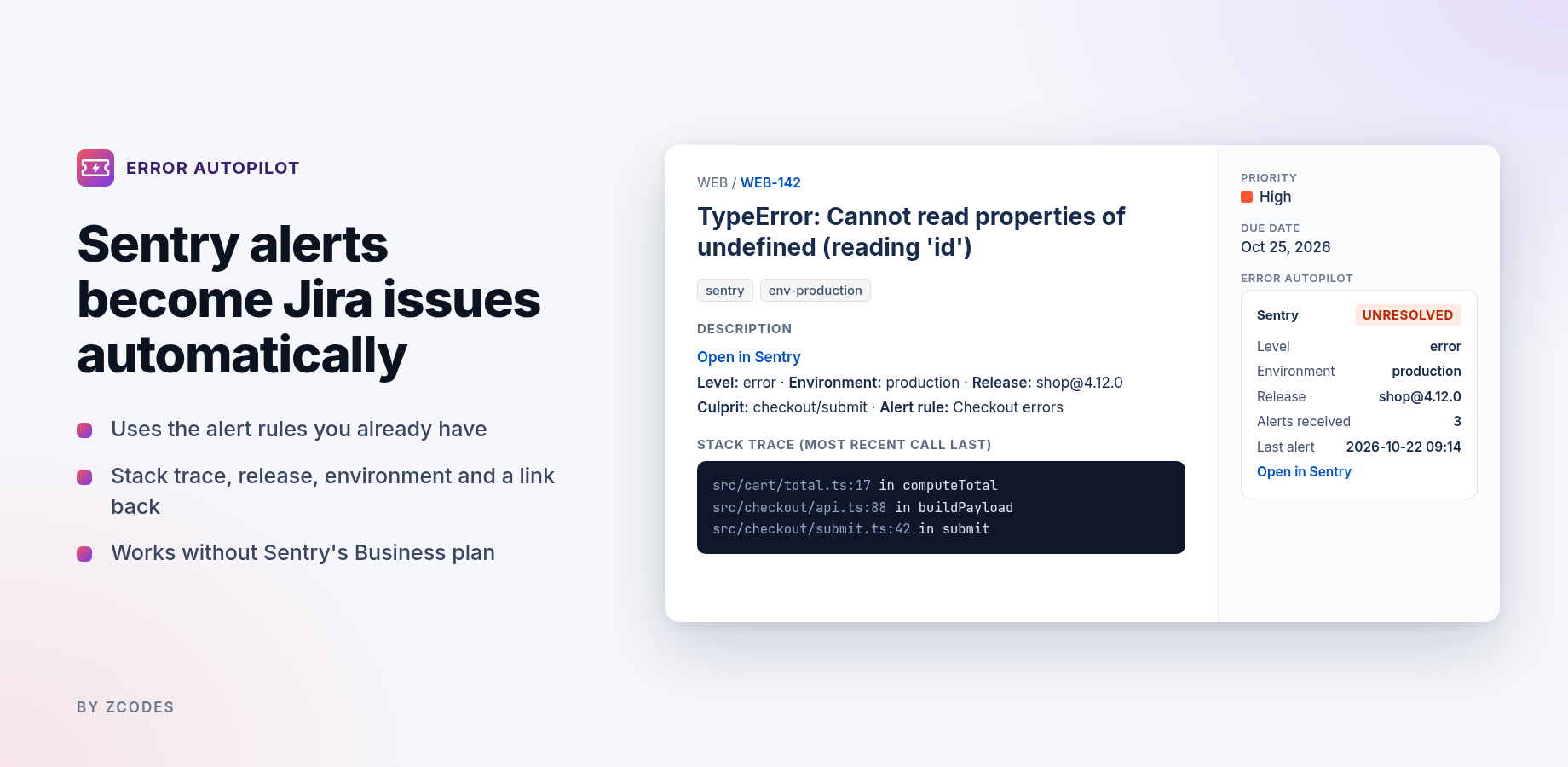
Sentry only creates Jira issues automatically on its Business and Enterprise plans. Error Autopilot fills that gap for Team-plan organisations (and self-hosted Sentry): when a Sentry alert rule fires, a Jira issue is created with the stack trace, environment, release, culprit and a link back. When the error is resolved or regresses in Sentry, the Jira issue follows.
| Feature | What it does |
|---|---|
| Automatic issues | One Jira issue per Sentry issue, created when an alert rule with the Error Autopilot action fires (or for every new Sentry issue, if you choose). |
| No duplicates | Repeat alerts become at most one comment per issue per window (default 6 h). Duplicate deliveries are ignored; links survive reinstalls. |
| Sync | Resolved in Sentry → comment or move to Done. Regressed → comment or reopen. |
| Escalation | After N regressions (default 2), raise priority (default Highest) and add a label (default recurring). |
| Storm guard | Above N new issues per hour (default 20), further new errors are listed on one "Error storm" issue instead of creating hundreds. |
| Noise control | Minimum level, environment filter, mute list. |
| Fields | Routing per Sentry project or alert rule, priority by level, due dates by priority, labels (incl. env-production), summary template, assignee follows Sentry. |
| Issue panel & JQL | A Sentry panel on linked issues, and JQL fields such as sentryStatus and sentryRegressions. |
| Other tools | GlitchTip and any tool that can POST JSON, via a token-protected URL. |
Install & connect Sentry
- Install Error Autopilot from the Atlassian Marketplace, then open Jira settings → Apps → Error Autopilot.
- On the Connect tab, copy the Webhook URL.
- In Sentry go to Settings → Integrations → Custom Integrations → Create New Integration → Internal Integration.
- Name:
Error Autopilot - Webhook URL: paste the URL from step 2.
- Turn on Alert Rule Action.
- Permissions: set Issue & Event to Read first. Sentry only lets you tick the issue webhook after that.
- Webhooks: tick issue. Save.
- Name:
- Copy the integration's Client Secret, paste it into Error Autopilot's Sentry client secret field and click Save.
- On the Routing tab, enter your Default Jira space key (e.g.
WEB) and save. - In Sentry, open an alert (or create one, e.g. "A new issue is created") and add the action Webhook → Error Autopilot.
- Back in Jira, click Send a test error on the Connect tab. You should see "Test passed: created WEB-1".
Routing & fields
| Setting | Default | Notes |
|---|---|---|
| Default Jira space key | none | Used when no routing line matches. Without it, nothing is created. |
| Routing | empty | One per line: sentry-project-slug=KEY, 4508812345=KEY (project ID), project name, or alert rule name. Alert payloads carry the numeric project ID, not the slug. |
| Issue type | Bug | Must exist in the target space. |
| Summary template | empty | Placeholders: {title} {shortId} {project} {level} {environment} {culprit} {release}. Empty = "[SHORT-ID] title". |
| Labels | sentry | Comma separated. Optional env-<environment> label. |
| Stack trace | on | Top in-app frames from the alert's event. |
| Priority by level | fatal=Highest, error=High, warning=Medium | Use your Jira priority names. If a space doesn't allow priority, the field is skipped and the issue is still created. |
| Due dates by priority | empty | e.g. Highest=1. Skipped automatically if the field isn't on the create screen. |
| Assignee | Off | "Follow Sentry assignments" matches the Sentry assignee's email to exactly one Jira user; otherwise it leaves the assignee alone. |
Rules
| Setting | Default | Notes |
|---|---|---|
| Create Jira issues | Only when an alert rule fires | "Every new Sentry issue" creates one for each new Sentry issue (noisier). |
| Minimum level | error | |
| Only these environments | all | e.g. production |
| Mute | empty | Errors whose title or culprit contains a line are never ticketed. |
| Storm guard | 20 per hour | 0 turns it off. |
| Repeat alerts | 1 comment per 6 h | |
| When resolved / regresses | comment | Or transition to Done / reopen (uses your workflow's status categories). |
| Escalate after | 2 regressions | Priority + label, once per issue. 0 turns it off. |
Issue panel & JQL
Issues created by Error Autopilot show a Sentry panel (status, level, environment, release, events, users, alerts received, regressions, first seen, last alert, link). The same data is indexed for JQL:
sentryStatus = regressed
sentryRegressions >= 2 ORDER BY priority DESC
sentryEnvironment = production AND sentryStatus = unresolved
sentryRelease = "shop@4.12.0"
sentryEvents > 100
Fields: sentryStatus (unresolved, resolved, regressed), sentryLevel, sentryEnvironment, sentryRelease, sentryEvents, sentryUsers, sentryAlerts, sentryRegressions, sentryIssueId. Event and user counts update when Sentry sends issue updates (resolve, regress, assign).
GlitchTip & other tools
The Connect tab shows a second URL that ends in ?token=…. The token is a password: keep it private, and use Issue a new token if it leaks.
GlitchTip
Project settings → Alerts → add a recipient of type General (Slack-compatible) Webhook with the token URL.
Any tool or script
curl -X POST "<token URL>" -H "Content-Type: application/json" -d '{
  "id": "checkout-500",            // stable id: repeats update the same Jira issue
  "title": "Checkout returns 500",
  "url": "https://status.example.com/incidents/42",
  "level": "error",                // debug | info | warning | error | fatal
  "environment": "production",
  "project": "shop",               // used for routing
  "status": "open",                // open | resolved | regressed
  "stacktrace": ["app.py:42 in submit"]
}'
Troubleshooting
Start with Activity in the app settings: it lists what arrived and why something was or wasn't created.
Nothing arrives at all (Activity is empty)
- Check the Sentry integration's Webhook URL matches the URL on the Connect tab exactly. Reinstalling the app can change it.
- Check the client secret: paste it again and save. A wrong secret is silently rejected (HTTP 401) for your safety.
- Make sure the alert rule has the Error Autopilot webhook action, and that it actually fired (Sentry → Alerts → history).
Activity says "no Jira project mapped"
Set a Default Jira space key, or add a routing line. Alert payloads use the numeric Sentry project ID; you can also route by alert rule name.
Activity shows an error like "Jira create 400: issuetype"
The issue type doesn't exist in that space. Set Issue type to one that does (e.g. Task). Priority and due date problems are handled automatically: the field is skipped and the issue is still created.
"mode=alerts", "below min level", "filtered" or "muted"
These are your rules working: the error didn't qualify. Adjust them on the Rules tab.
Resolve or regression isn't reflected in Jira
- The Sentry integration must have the issue webhook ticked.
- For "Move to Done" or "Reopen", your workflow needs a transition into a Done (or To Do / In Progress) category status from the current status.
Repeat alerts don't add comments
By design: at most one "fired again" comment per issue per window (Rules → Repeat alerts).
Assignee doesn't follow Sentry
The Sentry assignee's email must match exactly one Jira user that the app can find. Team assignments are ignored.
No Sentry panel / JQL field not recognised
The panel appears only on issues created or updated by the app. New JQL fields can take a few minutes to become searchable after install.
"Subscription inactive" banner
The app stops creating and updating issues when its subscription is inactive. A site admin can renew it in Administration → Apps.
"Only Jira administrators can do this"
The settings page and test button require the Jira Administrator global permission.
FAQ
Which Sentry plans does it work with?
Sentry Team and above, and self-hosted Sentry: any setup that offers custom (internal) integrations. Sentry's free Developer plan lists no third-party integrations.
Does it change anything in Sentry?
No. It only receives webhooks. Sentry stays the source of truth.
Will it flood Jira?
No: one issue per Sentry issue, throttled repeat comments, and the storm guard caps new issues per hour.
Can I route different Sentry projects to different Jira spaces?
Yes, on the Routing tab, by project slug, project ID, project name or alert rule name.
Data & security
- Runs on Atlassian (Forge). No outbound network calls; ZCODES has no servers that receive your data.
- Webhooks are verified with HMAC-SHA256 (Sentry) or a private token (others). The secret and token are kept in Forge's encrypted secret storage.
- Stored in your site's app storage: settings, the link between each Sentry issue and Jira issue with a small summary (status, counts, title), and the last 30 activity entries.
- Scopes: read/write Jira work items, read users (only to match a Sentry assignee by email), app storage.